Why I stopped reaching for WordPress on small blogs
Every few years someone asks: “What should I use for a simple blog?” WordPress is still the default answer, and it is not wrong. WordPress runs magazines, shops, and membership sites because it is a general-purpose CMS with thousands of extensions.
But “simple blog” and “WordPress install” stopped meaning the same thing somewhere around plugin number seventeen.
This post is not a hit piece. It is an honest map of what you are signing up for — and why Pressbin exists as a narrower alternative.
What you actually deploy with WordPress
A minimal self-hosted WordPress blog is never just WordPress. In practice you stack:
- A web server (nginx or Apache)
- PHP-FPM or equivalent
- MySQL or MariaDB as a separate long-running process
- WordPress core, a theme, and usually a few plugins (SEO, cache, security, backups)
- Optional Redis or object caching when traffic grows
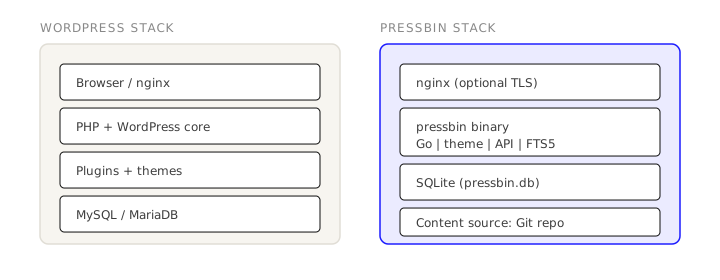
Each layer has its own update cadence and failure modes. A security advisory in a popular plugin is a real incident, not a theoretical one. For a personal site with twelve posts per year, you are operating a small fleet to publish text.
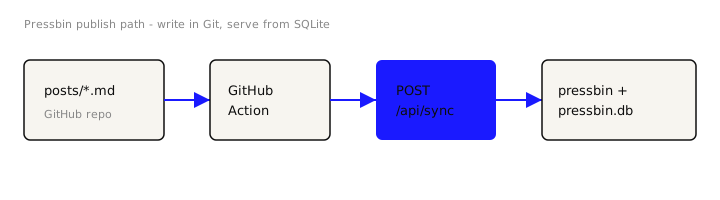
Pressbin compresses that stack to one Go process and a pressbin.db file
beside your config. Markdown lives in a Git repository; when you push, a GitHub
Action calls POST /api/sync and the server stores pre-rendered HTML in SQLite.
Public page views are reads from that database — no PHP execution per request,
no ORM, no admin UI on the open internet.
Where WordPress is still the right call
I would still recommend WordPress when:
- Non-technical authors need a visual editor and in-browser publishing
- You need WooCommerce, memberships, or complex content types out of the box
- You rely on a specific plugin ecosystem (events, bookings, multilingual workflows)
- You want managed hosting that abstracts the stack (WordPress.com, WP Engine, etc.)
Pressbin does not ship a block editor, a theme marketplace, or a plugin directory. It is not trying to be a CMS for everyone.
Where a binary + Git makes more sense
Pressbin fits when you are the author and Git is already how you work:
- Posts are
.mdfiles with YAML front matter (title,date,tags,summary) - Publishing is
git commit+git push— the same muscle memory as code - Search is SQLite FTS5, built in, not another SaaS tab
- Upgrades are deliberately boring: stop systemd, replace the
pressbinfile, start again
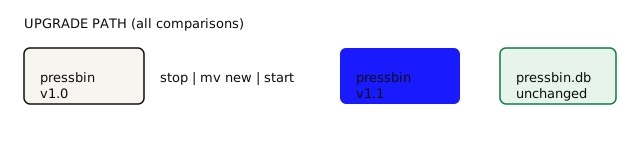
Migrations run against pressbin.db on startup. You are not exporting SQL dumps
or running wp-cli upgrade scripts across three subsystems.
Performance and security, honestly
WordPress can be fast. Cached pages on good hosting are fast. But fast WordPress is usually engineered — page caches, object caches, tuned PHP, CDN rules.
Pressbin’s model is smaller: render Markdown once at sync time, serve HTML from SQLite on read. There is less to misconfigure because there is less to configure.
Security posture differs too. WordPress exposes /wp-admin to the world unless
you hide it. Pressbin has no public writing UI; sync keys (pb_sync_...) and
admin keys (pb_admin_...) are bearer tokens for API routes only.
A practical decision checklist
Ask yourself:
- Who writes? Only you in a editor/IDE → Pressbin is natural. A team in a browser → WordPress or Ghost.
- What ships besides posts? Store, members, forms → WordPress. Essays and tags → Pressbin.
- How do you want to host? Shared PHP hosting → WordPress fits the market. A $5 VPS and systemd → Pressbin is a single binary drop.
- How do you want to back up?
mysqldump+wp-contenttarball vscp pressbin.db+git cloneof your content repo.
Closing thought
WordPress earned its share of the web by being everything to everyone. Pressbin is the opposite trade: fewer features, fewer moving parts, a clear boundary.
If your blog is how you think in public — and you already think in repos — you
may not need a platform. You may need an engine that gets out of the way after
git push.